
Evoke and Express, two words that both revolve around the topic of emotions and feelings, but have you ever looked at the words closely in the topic of storytelling. Both words are very similar and can sometimes be misused and substituted out for one another, but in reality they both mean very different things. To evoke an emotion is to try and place it into the head of someone else through words or visuals. It’s like trying to force someone to feel a specific way. On the other hand when someone is expressing an emotion this is them physically communication a specific emotional state or attitude. So if you look at it from the most simplistic point of view the expression of emotion is the result of whatever emotion you were trying to evoke, but the kicker is, both emotions don’t always match up. This is the where storytelling and art become mostly subjective. Every single person can look at the same design, but each one can feel a different thing based on their past experiences, their current environment and what morals/values they hold important as a person.
Using Pultchick’s taxonomy of emotions you can see the base 8 emotions a human has and the different degrees of intensity we can feel. Once a designer or storyteller understands these emotions they can create/design anything to try and evoke specific ones. In the end though, it’s the individual person that will choose to express whichever one over takes them first. The two photos I have chosen to show below are both used to evoke a specific emotion in someone viewing them, but for me once I saw them I expressed completely different ones.
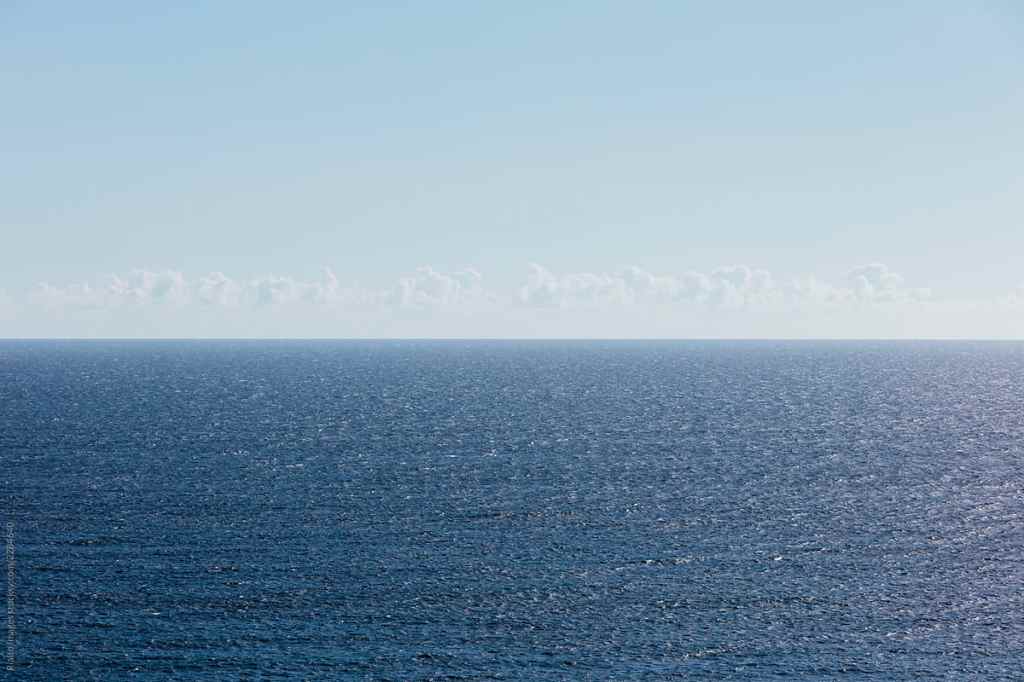
The first photo is of the open ocean. It’s all blue and the water is flat and peaceful. Both the look of the photo and the colors portrayed in the photo suggest that the image is trying to evoke a sense of serenity and calmness. But to me I feel and express a sense of fear and dread because I found the picture to be vast, empty and lonely. Part of Pultchick’s theory was that we express specific emotions in specific situations in order to survive. The Interaction Design Foundation wrote that “He argued that the primary emotions are an evolutionary development and that the response to each such emotion is the one that is likely to deliver the highest level of survival possibility.” So for someone like me who has grown up living next to the ocean and seen first hand just how dangerous the water can be, for my survival I don’t just see the ocean as a beautiful vacation spot, I respect that it’s highly scary out there and that I would never survive being trapped in the middle of it. So looking at this photo and thinking about being trapped in that vast amount of water evokes fear instead of serenity.

The other photo that I found is a poster/ t-shirt design for Trump supporters. The graphic is a spoof on the LGBT communities acronym but instead it’s substituting the words for things that Trump supporters find important. To the creators and the people who support him, the image can evoke a sense of admiration, but for someone like me who has different views the expression of emotion I make is rage. I think the graphic is widely disrespectful to the LGBTQIA+ community who have been mistreated for so long to take similar colors and the same letters and mock it, absolutely pisses me off. This again comes from the fact that I have different shared experiences then other people and my morals and environment affect the way I perceive things. But one other thing that I find interesting and that is very similar to the other photo is that both changes in emotion were of the same intensity. Rage and admiration are both very strong emotions and serenity and fear are both moderate emotions. After discovering this I have to ask myself if that happens often or was it just a coincidence for these two examples.
Overall, it is clear using the taxonomy of emotions that designing and creating based on the 8 emotions is very important. If designers continue to hone that skill it will only make relationships between humans and products/stories even stronger. “Products and platforms will change, but our spectrum of emotion will not change. This is the key takeaway — that we have a finite set of emotions, and there will never be a sadness 2.0. It’s actually great that we have that constraint to work within because it’s going to help us design better product relationships for the future” (Kazim). And even though evoking and emotion can be very subjective and doesn’t always mean the same one will be expressed, it’s good to have an idea and direction for the design to go into. So my final question for you guys is, what do you feel? If you look at these photos or any kind of design do your past experiences and subjective feelings dictate what you express?







 taylorsniffen.com
